Type the name of any app. The AI Co-Pilot finds API documentation, builds the connector, tests it against live APIs, and self-corrects when something breaks. The same Assembly Editor is fully operable by Claude Code through the APIANT plugin: point it at a new API and it builds, tests, and wires the connector end-to-end.
The Assembly Editor is where API endpoints become reusable building blocks -- what we call ingredients. Traditionally, this is where builders either accelerate or stall. The ones who master it become unstoppable. The AI Co-Pilot eliminates the learning curve entirely.
Type the name of any application -- for example, "Asana." That is all you need to start.
The Co-Pilot checks the existing connector catalog. If a connector already exists, it opens it and asks you to connect your account.
If no connector exists, the Co-Pilot searches for the API documentation online, identifies available versions, and recommends the latest.
It determines the authentication method -- OAuth 2.0, API key, HTTP Basic, or others -- and builds the connection assembly automatically.
The Co-Pilot walks you through connecting your account, then verifies the connection works with a live test.
It scans the API and determines what it can build -- actions, triggers, or both. Some APIs are read-only (like RSS feeds), and the Co-Pilot is smart enough to know it cannot build write actions for those.
Based on the documentation, it recommends specific endpoints to build: "Delete Task," "Create Project," "Update Assignment," and more.
Select the endpoint you need. For example, "Delete Task."
The Co-Pilot figures out the input fields, settings, and UI controls needed. For a delete action, it knows it only needs the task ID.
It writes the code -- making real API calls via curl to understand request and response schemas. The AI invokes tools, reads the results, and builds its understanding interactively.
It creates test data autonomously (for example, POSTing a new task so it has something to test the delete against), executes the action, and confirms it got the expected result.
If it makes a mistake -- and sometimes the AI does make mistakes with the code -- it catches the error on iteration and self-corrects. No human intervention required.
The finished assembly produces a reusable ingredient that plugs directly into the Automation Editor with full platform benefits: rate limiting, error handling, retry logic, and monitoring.
The Co-Pilot does not just autocomplete. It researches API documentation, understands authentication, builds the connector, tests against live APIs, and self-corrects when something does not work. It is an engineer that works overnight.
Got a deal that requires integrating with an app you have never touched? Point the Co-Pilot at it. By morning, you have production-ready building blocks.
Most competing platforms use SDKs for API integration -- you write code against their SDK, and that is it. APIANT's Assembly Editor is fundamentally different: it is an interactive, visual, back-and-forth dialogue with the API. The AI does not just generate static code -- it makes real API calls to understand schemas, creates test data to validate its work (for example, creating an Asana task so it can test the delete), reads the actual responses, and iterates when something does not match expectations.
This interactive model is what makes the Co-Pilot possible. An SDK-based platform has no equivalent foundation to build on. The Co-Pilot is not just an AI feature -- it is a capability that only exists because of APIANT's unique architecture.
Assemblies create ingredients -- individual API operations like "Get Client Services by Product ID" or "Delete Task in Asana." These ingredients are then combined in the Automation Editor into recipes -- complete integrations with logic, branching, and error handling.
One ingredient can be reused across many recipes. That is the power of the model. Build the connector once, use it everywhere.
Every assembly produces an ingredient that can be dropped into any automation. Build once, deploy across dozens of integrations.
Every ingredient inherits rate limiting, error handling, retry logic, and monitoring from the platform -- automatically.
What used to take hours of reading API docs, testing endpoints, and debugging now happens in a single conversation with the Co-Pilot.
From Assembly to Automation
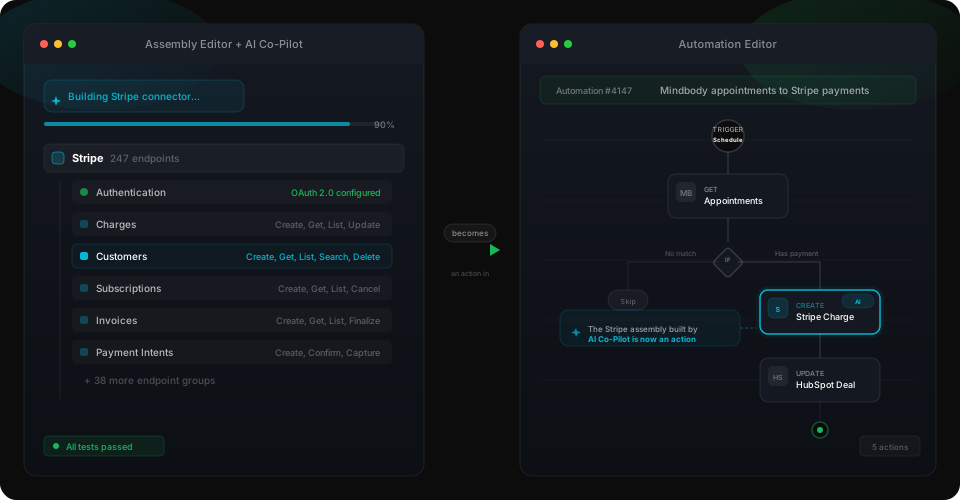
Assemblies create the building blocks. Automations wire them together. The Admin Console deploys them at scale.
See the AI Co-Pilot in action or explore the full platform.
