
Zoom and Mindbody: Run Virtual Yoga Classes With Booking on Autopilot

Adding online classes is one of the most practical ways to grow a yoga studio. You reach students far beyond your neighborhood, you give your current members more ways to practice, and you do it without renting another inch of space. This guide walks through how to run virtual yoga on Zoom while Mindbody handles the booking and payments for you.
Why online classes are worth it for your studio
Virtual classes are not just a backup plan. They open up real growth for your business and real benefits for your students.
- Reach a wider audience. Online classes let you attract students from anywhere, not just the people who can drive to your door. That is a genuine path to growth.
- More flexibility for students. People can practice on their own schedule and from wherever they are, which keeps busy members enrolled instead of dropping off.
- Lower overhead. Online sessions do not need a rented room, so you can offer more classes without raising your costs.
- Better accessibility. Students with physical limitations, or those who live far from any studio, can finally take part.
- Added convenience. Members can join from home and skip the commute, which makes it easier for them to stick with their practice.
Together, these make virtual classes a valuable addition to almost any studio’s lineup.
Setting up Zoom for your classes
Zoom is a widely used video platform and a reliable home for virtual yoga sessions. Getting started is straightforward.
- Create a Zoom account. Sign up on the Zoom website and pick the plan that fits the size of your classes.
- Schedule your classes. Use Zoom to set the date, time, and length of each session.
- Share the link. Once a class is scheduled, your students join by clicking the meeting link.
- Get comfortable with the tools. Spend a little time with features like screen sharing and virtual backgrounds so your sessions look polished.
A short bit of setup here pays off in a smooth, professional experience for every student who joins.
Letting Mindbody handle bookings and payments
Zoom runs the class. Mindbody runs the business side. When the two work together, you stop doing the busywork by hand.
- Set up your Mindbody account. Sign up and choose the plan that suits your studio.
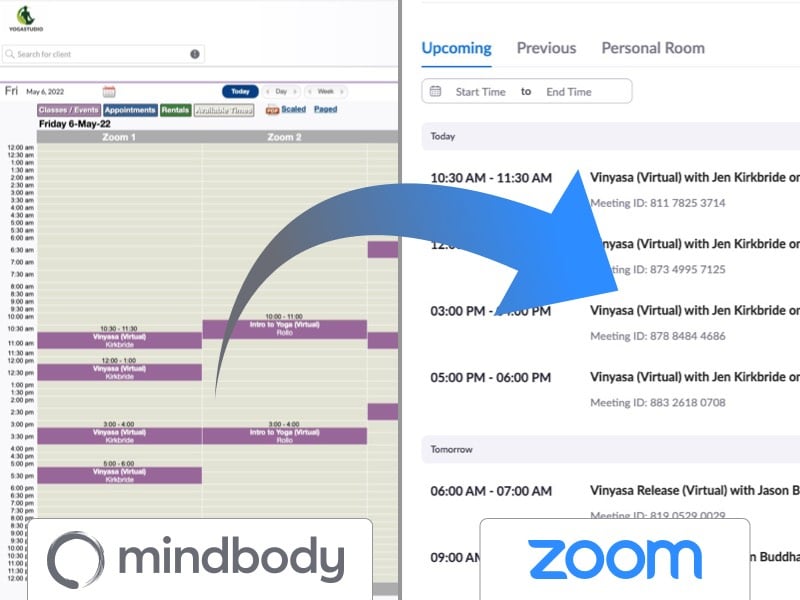
- Connect Mindbody and Zoom. Use the Mindbody and Zoom integration from APIANT to link the two. Once connected, a student who books a virtual class in Mindbody automatically gets what they need to join on Zoom, with no manual steps from you.
- Manage schedules and registrations. Build your class schedule and track who is signed up, all in Mindbody.
- Handle payments and memberships. Mindbody takes care of online payments and memberships, so revenue is collected and tracked without extra work.
With Mindbody managing classes, registrations, and payments, your online studio runs as smoothly as your in-person one, and you are not stuck copying details between two systems.
Getting students to sign up
Online classes only grow your business if people know about them. A few proven ways to fill your virtual classes:
- Use social media. Announce your online classes on the platforms your members already use, and post helpful content like yoga tips to keep interest up.
- Email your existing students. Your current members are your warmest audience. Let them know about virtual classes and any launch offers.
- Partner with influencers. A recommendation from a trusted voice in fitness and wellness can put your classes in front of new students.
- Offer a trial or a discount. A free first session or an introductory rate lowers the barrier and turns curious visitors into regulars.
- Build a simple website. A dedicated page for your virtual studio, with your schedule, your instructors, and student testimonials, makes signing up easy.
A little consistent promotion goes a long way toward building a steady online following.
Making every virtual class feel professional
A great online class comes down to a few habits. Keep these in mind and your students will keep coming back.
- Check your setup before class. Confirm your internet, camera, and microphone are working so nothing interrupts the session.
- Pick a quiet, well-lit space. A calm, clearly visible spot helps students follow along.
- Communicate clearly. Speak at a steady pace and use clear demonstrations to guide students through each pose.
- Invite interaction. Give students room to ask questions and share feedback. It builds the same sense of community your in-person classes have.
- Share resources afterward. Recorded sessions, pose guides, and reading suggestions help students keep practicing between classes.
Get these basics right and your virtual classes will feel just as cared-for as the ones in your studio, which is exactly what keeps students enrolled.
Ready to take your yoga studio online?
Keep reading

The Gap Between "I Paid" and "I'm Booked"
A customer buys a class pack on Shopify, then can't figure out how to book it. Here's how a Mindbody booking widget and ShopConnect close that gap for good.

Mindbody and HighLevel: One Clear Schedule Per Student Across Every Program
If your studio runs beginner programs, longer courses, and private lessons at once, here is how your reminders finally match what each student actually has booked.

Mindbody and Klaviyo: Per-Location Marketing for a 6-Gym Strength Network
A central marketing team sending one blast to every member of a 6-gym network gets the coach name and the gym address wrong half the time.