Your AI agent builds the connectors, composes the automations, runs the tests, and ships to production. Any AI client that takes a remote MCP server can drive it, Claude Code, Codex and Cursor included. APIANT is the platform underneath: deep, durable, and white-labeled to your brand.
The next generation of the APIANT platform, running alongside classic. APIANT.AI is rebuilt around the agent: ask for an integration and it is built, tested against every scenario before it ships, and kept running. Each integration is stored as data and drawn as a diagram you can read. Free to start.
Most integration platforms parse data format-by-format: JSON one way, XML another, CSV another. Each path has its own scaling ceiling.
APIANT's unified data processing engine normalizes every format before transformation. The result: linear scaling regardless of format, massive payloads handled natively (no batch splitting, no hard limits), and one consistent way to query and transform data across any API. This is the foundation the entire platform is built on.
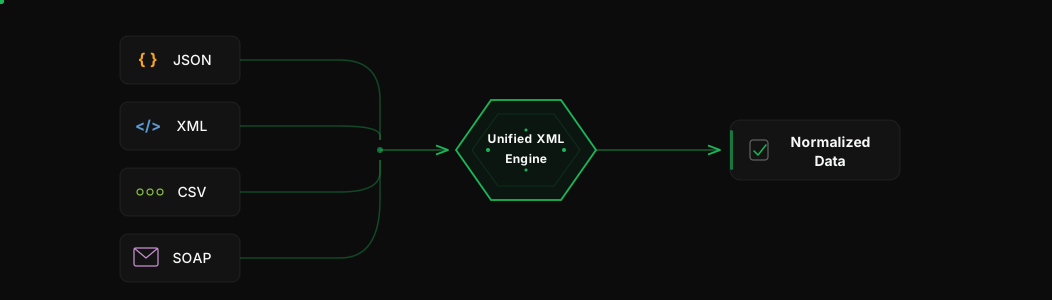
JSON, XML, CSV, SOAP - all processed through one unified model. No format-specific bottlenecks.
Handle massive API responses natively. No batch splitting required. No hard limits on data size.
XPath across every format. A well-documented W3C standard, not a proprietary DSL you have to learn and get locked into.
Engineered to process data without building full object trees in memory. Scales without ballooning resource usage.
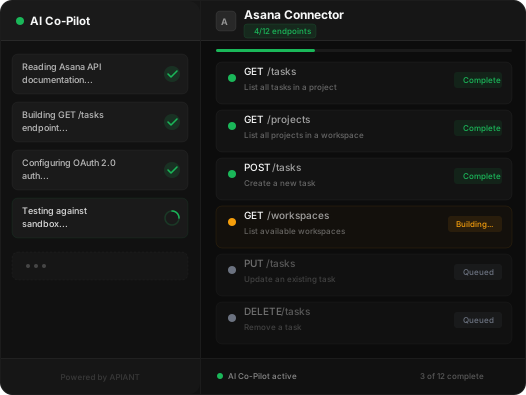
The Assembly Editor is where API endpoints become reusable building blocks - what we call ingredients. The AI Co-Pilot eliminates the learning curve entirely. Type the name of any app. The Co-Pilot finds the API documentation, determines authentication, builds connectors, tests them against live APIs, and self-corrects when something breaks.
Got a deal that requires integrating with an app you have never touched? Point the Co-Pilot at it. By morning, you have production-ready building blocks. No engineer touched it.
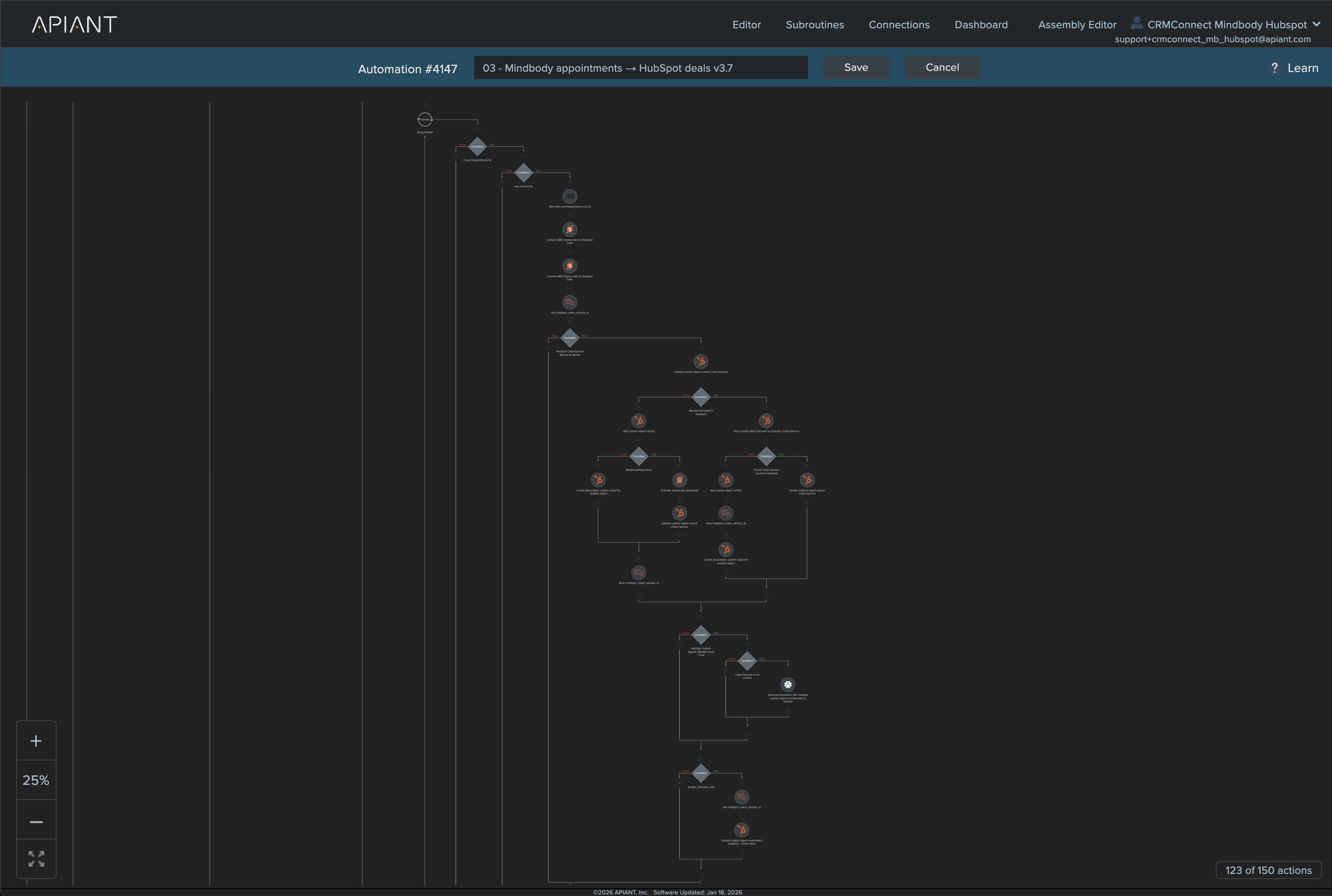
This is where ingredients become recipes. Build the logic (conditional branching, error handling, data transformation) that turns a basic sync into a deep integration. Each automation does one thing well: process a booking, handle a renewal, trigger a replenishment campaign.
The same automation serves a single yoga studio and a 232-location franchise. The logic is identical. The settings are different.
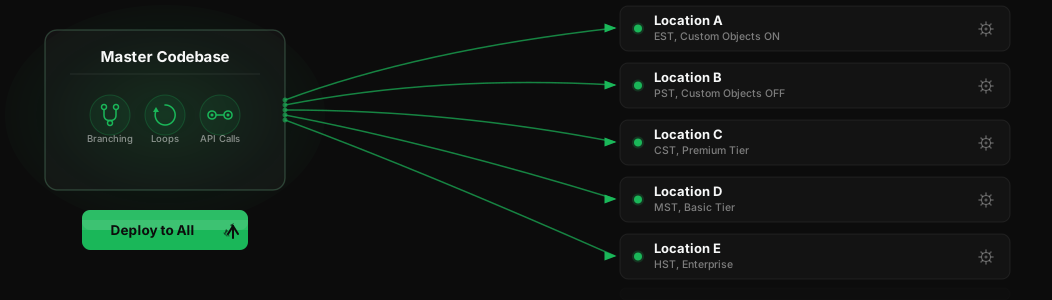
The secret to productized integrations: separate what's universal from what's unique. Logic (data flow, error handling, object mapping) is the same for everyone. Settings (which fields to sync, which features to enable, time zones) differ per customer.
APIANT enforces this architecturally. Every automation has a settings layer customizable per deployment without touching logic. One codebase serves 232 Exercise Coach locations, each configured differently, all upgraded simultaneously. Settings surface directly in FormApps for a clean, branded configuration UI.
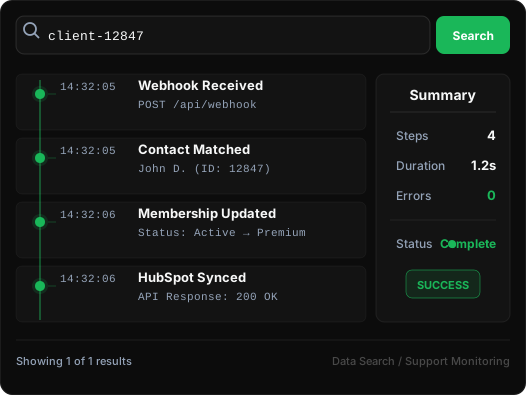
Supporting integrations at scale means answering questions fast. APIANT gives you complete visibility into every automation, every data flow, every API call.
Search any piece of data - a client ID, an email, a record number - and instantly see every step it passed through, every transformation, every API response. No log diving. No guesswork. For enterprise deployments, connect to Splunk, Datadog, or any monitoring tool for real-time dashboards showing API throughput, error rates, and rate limit compliance.
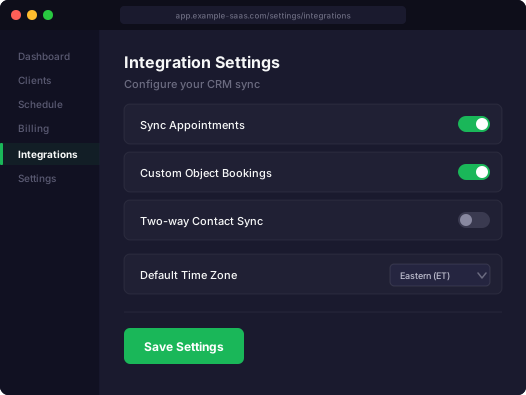
Your end users install and configure integrations without ever leaving your product. APIANT is invisible. Your brand is front and center. FormApps let you build custom UIs - setup wizards, configuration panels, dashboards - and embed them directly inside your SaaS product.
The settings from the Automation Editor surface directly in FormApps. That means the same checkbox that controls custom object branching in your automation logic becomes a toggle your end user clicks in their settings panel. No middleware. No separate portal.
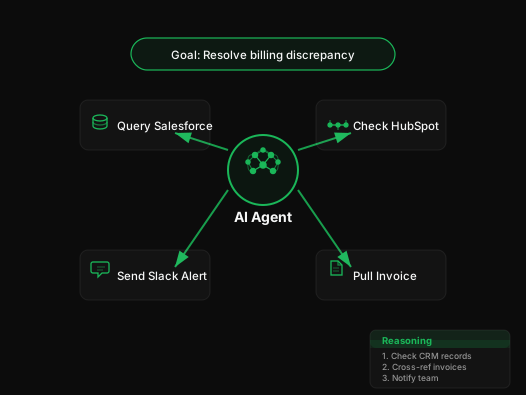
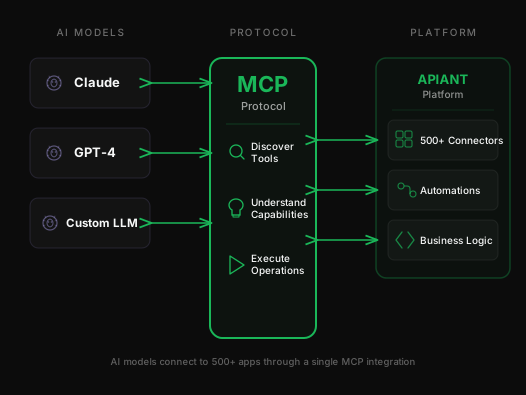
APIANT agents operate inside the full integration platform with access to 500+ connectors, your automations, and your business logic. Goal-driven agents that orchestrate multi-step workflows, query live data across systems, and take action based on real business context.
Combine an agent's reasoning with the platform's execution layer: AI that moves data, triggers processes, and resolves issues autonomously.
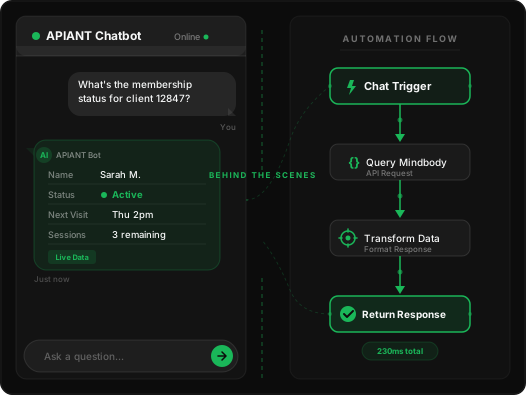
A single chat interaction can trigger complex automation behind the scenes. A customer asks a question in natural language. The chatbot interprets intent, fires a trigger, and the platform executes the full workflow - pulling data from one system, transforming it, pushing it to another, and returning a response. All in one conversational turn.
No pre-built decision trees. No rigid flows. The chatbot leverages the same automations and connectors your team already built, making every conversation an entry point to your entire integration layer.
MCP (Model Context Protocol) servers give AI models direct, structured access to your integrations. Instead of wrapping API calls in custom code, MCP provides a standardized protocol that any compatible AI model can use to discover available tools, understand their capabilities, and invoke them with proper context.
APIANT's MCP servers expose your automations and connectors as tools that AI models can call natively. This is not a wrapper or an adapter - it is protocol-level interoperability between AI and your integration layer.
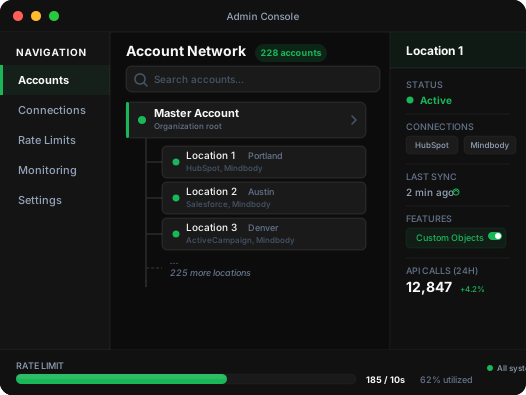
Full control over your dedicated APIANT server. Manage users, account networks, connection sharing, rate limits, and monitoring - all from one console. Manage everything. Even shut it down.
Account networks let a master account manage hundreds of child accounts, each representing a location or customer. New locations inherit shared connections and settings automatically. Set rate limits at the platform level - the system enforces them across all accounts. Deploy codebase upgrades to every linked account simultaneously with one click.
Point your AI agent at APIANT and tell it what to integrate, or talk to our team about what you are building.
Zapier and Make are shallow, multi-tenant automation tools best for lightweight triggers. Workato is closer to APIANT in depth but runs your workflows on their shared infrastructure. APIANT gives you a dedicated server you brand as your own, plus a unified data processing engine that handles JSON, XML, CSV, EDI, and binary formats through one format-agnostic engine. You get deep integrations (custom objects, bi-directional sync, real business logic), full white-label, and no per-task pricing that blows up at scale.
Every APIANT customer runs on their own isolated server instance. No shared tenancy, no noisy neighbors, and no data commingling with other customers' workloads. That matters for compliance (your data never touches shared infrastructure), performance (you own the rate limit headroom), and branding (the server runs on your subdomain, under your name).
The Automation Editor has retry logic, error branching, and dead-letter handling built in. Failed calls are logged with full request and response bodies so your team can search by any field (client ID, email, record number) and see exactly what went wrong. You can configure retry intervals, route errors to alerts, or push them to Splunk, Datadog, or any monitoring tool for enterprise deployments.
The Co-Pilot reads the API docs, determines authentication, generates operations, and tests them against live endpoints. It self-corrects when something breaks. The output is an Assembly (a set of ingredients) you still review before putting in front of customers, the same way you would review any other connector. It removes the grunt work, not the engineering judgment.
Two ways to run it. Give your AI agent the APIANT MCP server address and it operates the platform directly: building connectors, composing automations, running tests, deploying, and monitoring production. Any AI client that takes a remote MCP server works, Claude Code, Codex and Cursor included, and there is nothing to install. If you would rather work visually, a workflow architect (someone with domain expertise, not engineering skill) runs the Automation and Assembly editors with the AI Co-Pilot. Either way, the platform handles rate limiting, retries, error handling, monitoring, and scaling.
Rate limiting is enforced at the platform layer across every automation hitting the same endpoint. When 50 locations share a single Salesforce or Mindbody app, APIANT throttles and queues requests so the combined traffic stays under the API's limits. You set the limits once in the Admin Console and the system enforces them everywhere.
Published pricing tiers (Sandbox $99/mo, Pro $499/mo, Scale $1,500/mo, Enterprise from $3,500/mo) include the dedicated server, the full Automation and Assembly editors with AI Co-Pilot, the Admin Console, FormApps, access to 500+ prebuilt connectors, and platform-level monitoring. Enterprise tiers add dedicated AWS infrastructure, a contractual SLA, priority support, and help with migration and training. Anything custom (managed build, specific compliance documentation) is scoped separately.
Your request will be posted to our Discord community, where independent builders who run their own APIANT-powered platforms can see it and reach out to you directly to build the integration.
← BackWe'll take a quick look to learn about your business.
Based on what we found, here are integration products that might be a great fit.
Your integration specialist is ready. Alex already knows your platform and what you're looking to build. Choose how you'd like to connect:
Voice call happens right in your browser. WhatsApp options open the app.
Prefer email? We'll follow up at within 2 hours.
Click the button below to start talking. Alex already has your details.
Your browser will ask for microphone access.
← BackExpect to hear from us within one business day.
Something went wrong. Please try again.
