এআই-চালিত, যুক্তিনির্ভর ইউআই তৈরি করুন যা সরাসরি এপিআইএএনটি অটোমেশন ইঞ্জিনের সাথে সংযুক্ত থাকে। ক্লড কোড এপিআইএএনটি প্লাগইনের মাধ্যমে ফর্মঅ্যাপস স্কাফোল্ড ও সংযুক্ত করতে পারে। আপনার শেষ ব্যবহারকারীরা কখনো এপিআইএএনটি দেখে না। তারা আপনার পণ্যটি দেখে।
A FormApp is a custom UI connected directly to the APIANT অটোমেশন engine. The সেটিংস you configure in the Automation Editor surface directly in the FormApp, giving your end users a clean, branded কনফিগারেশন experience, without exposing any of the underlying প্ল্যাটফর্ম complexity.
Forms, ড্যাশবোর্ডs, কনফিগারেশন panels, intake wizards, any interface your users need. Built with a drag-and-drop builder. Branded as yours.
500+ সংযোগকারীs, AI processing, conditional logic, ডেটা ট্রান্সফরমেশনs, ত্রুটি হ্যান্ডলিং, the full প্ল্যাটফর্ম running invisibly behind the scenes.
FormApps are how APIANT becomes invisible behind your পণ্য. Your ইন্টিগ্রেশন infrastructure looks and feels native to your users, because it is.
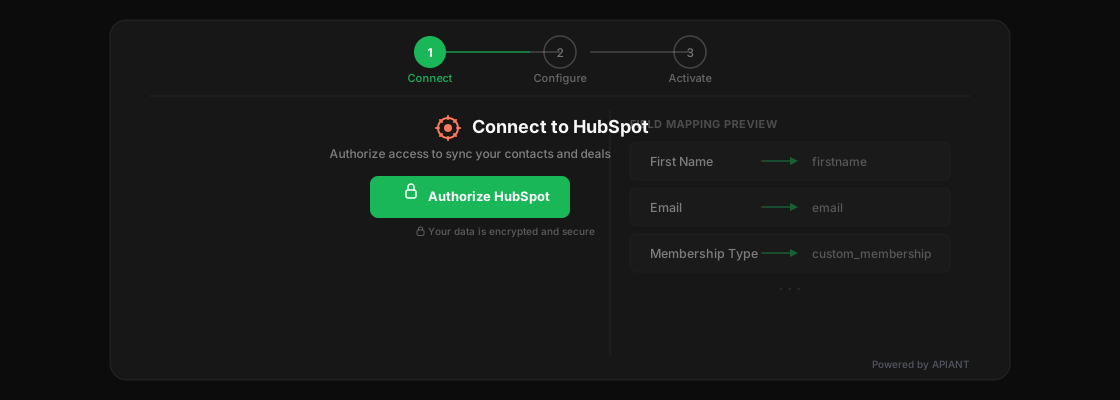
Your গ্রাহক clicks "Connect to HubSpot" inside your পণ্য. A FormApp handles authentication, field mapping, and কনফিগারেশন. APIANT runs the অটোমেশন behind the scenes. The গ্রাহক never leaves your পণ্য. They never see APIANT. They think it's you.
FormApps embed via iframe or SDK directly inside your SaaS পণ্য. No redirects, no external branding.
আপনার ব্র্যান্ড, আপনার জগৎ, আপনার নিজস্ব রূপ ও অনুভূতি। অ্যাপিয়েন্ট পর্দার আড়ালেই থাকে, যেখানে তার থাকা উচিত।
Every FormApp is backed by the full APIANT অটোমেশন engine: সংযোগকারীs, logic, AI, data processing, ত্রুটি হ্যান্ডলিং.
FormApps are the front door to the APIANT প্ল্যাটফর্ম. Any interface that needs to trigger, configure, or display ইন্টিগ্রেশন logic can be a FormApp.

Embed কনফিগারেশন panels directly inside your SaaS পণ্য. Let গ্রাহকs connect প্ল্যাটফর্মs, map fields, and manage sync সেটিংস without leaving your interface.

Power the entire in-app ইন্টিগ্রেশন experience within প্ল্যাটফর্মs like ActiveCampaign's App Studio. Surface সেটিংস, কনফিগারেশন, and status directly inside the partner's পণ্য.

Build intelligent intake forms that use AI to auto-complete fields, validate data, and trigger complex অটোমেশনs the moment a form is submitted. Not a static form. A smart one.

Give end users the power to manage their own ইন্টিগ্রেশনs. View sync status, adjust সেটিংস, re-authorize connections, all through a branded portal you control.

Combine UI, অটোমেশন, and AI in one surface for internal operations. Build ড্যাশবোর্ডs, admin panels, and ওয়ার্কফ্লো tools that connect to any system in your stack.
The অটোমেশন সেটিংস you build in the Automation Editor surface directly into FormApps. No translation layer. No separate UI build. The FormApp IS the সেটিংস UI.
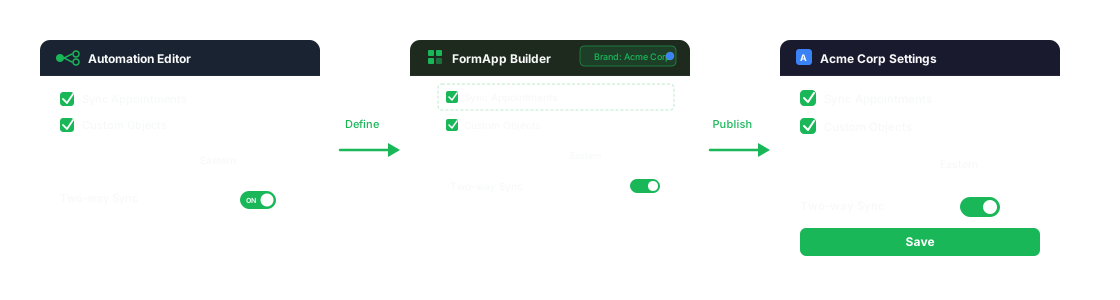
Define সেটিংস: checkboxes, dropdowns, multi-selects, the controls that shape how each গ্রাহক consumes the ইন্টিগ্রেশন.
সেটিংস surface স্বয়ংক্রিয়ভাবে. Arrange them, brand them, add logic and AI. No re-building the controls from scratch.
End users see a clean কনফিগারেশন panel inside your পণ্য. They interact with the same সেটিংস that drive the অটোমেশন logic.
Remember the সেটিংস layer in the Automation Editor (the checkboxes, dropdowns, and multi-selects that control how each গ্রাহক consumes the ইন্টিগ্রেশন)? Those সেটিংস surface directly into FormApps. So when a SaaS company's গ্রাহক opens an ইন্টিগ্রেশন কনফিগারেশন panel inside the পণ্য, they're seeing and interacting with the same সেটিংস that drive the অটোমেশন logic. No translation layer. No separate UI build. The FormApp IS the সেটিংস UI.
FormApps are not just forms. They are programmable UI surfaces backed by the full power of the APIANT প্ল্যাটফর্ম.
দৃশ্যমানভাবে ইন্টারফেস তৈরি করুন। কোড না লিখে ফিল্ড, সেকশন এবং কম্পোনেন্টগুলো সাজান।
ব্যবহারকারীর ইনপুট এবং ডেটার শর্তানুযায়ী ফিল্ড, সেকশন বা সম্পূর্ণ ধাপ দেখানো ও লুকানো।
Auto-completion, intelligent defaults, and AI-driven validation powered by the প্ল্যাটফর্ম's native AI capabilities.
Checkboxes, dropdowns, multi-selects, all driven by the ইন্টিগ্রেশন logic in the Automation Editor. No re-building.
Drop a FormApp into any web application. iframe for simplicity, SDK for deeper ইন্টিগ্রেশন and event handling.
Every FormApp has full access to the APIANT অটোমেশন engine: 500+ সংযোগকারীs, data engine, AI, ত্রুটি হ্যান্ডলিং, and মনিটরিং.
একটি বাস্তব এমবেডেড পরিস্থিতিতে FormApp দেখতে ও কাজ করতে কেমন হয় তা দেখুন।
Build AI-powered UIs that connect directly to the APIANT অটোমেশন engine. Make ইন্টিগ্রেশন invisible.
Your request will be posted to our Discord community, where independent builders who run their own APIANT-powered প্ল্যাটফর্মs can see it and reach out to you directly to build the ইন্টিগ্রেশন.
← পিছনেআপনার ব্যবসা সম্পর্কে জানতে আমরা দ্রুত দেখব।
Based on what we found, here are ইন্টিগ্রেশন পণ্যs that might be a great fit.
Your ইন্টিগ্রেশন specialist is ready. Alex already knows your প্ল্যাটফর্ম and what you're looking to build. Choose how you'd like to connect:
ভয়েস কল সরাসরি আপনার ব্রাউজারেই হয়। WhatsApp অপশনগুলো অ্যাপটি খোলে।
ইমেইল পছন্দ করেন? আমরা এখানে ফলোআপ করব 2 ঘণ্টার মধ্যে।
কথা বলা শুরু করতে নিচের বোতামটি ক্লিক করুন। অ্যালেক্সের কাছে আপনার বিবরণ আগে থেকেই আছে।
আপনার ব্রাউজার মাইক্রোফোন ব্যবহারের অনুমতি চাইবে।
← পিছনেএক কার্যদিবসের মধ্যে আমাদের কাছ থেকে শুনতে পাবেন বলে আশা করুন।
কিছু ভুল হয়েছে। অনুগ্রহ করে আবার চেষ্টা করুন।
