Build AI-powered, logic-driven UIs that connect directly to the APIANT automation engine. Your AI agent can scaffold and wire FormApps over MCP, from any client you already use. Your end users never see APIANT. They see your product.
A FormApp is a custom UI connected directly to the APIANT automation engine. The settings you configure in the Automation Editor surface directly in the FormApp, giving your end users a clean, branded configuration experience, without exposing any of the underlying platform complexity.
Forms, dashboards, configuration panels, intake wizards, any interface your users need. Built with a drag-and-drop builder. Branded as yours.
500+ connectors, AI processing, conditional logic, data transformations, error handling, the full platform running invisibly behind the scenes.
FormApps are how APIANT becomes invisible behind your product. Your integration infrastructure looks and feels native to your users, because it is.
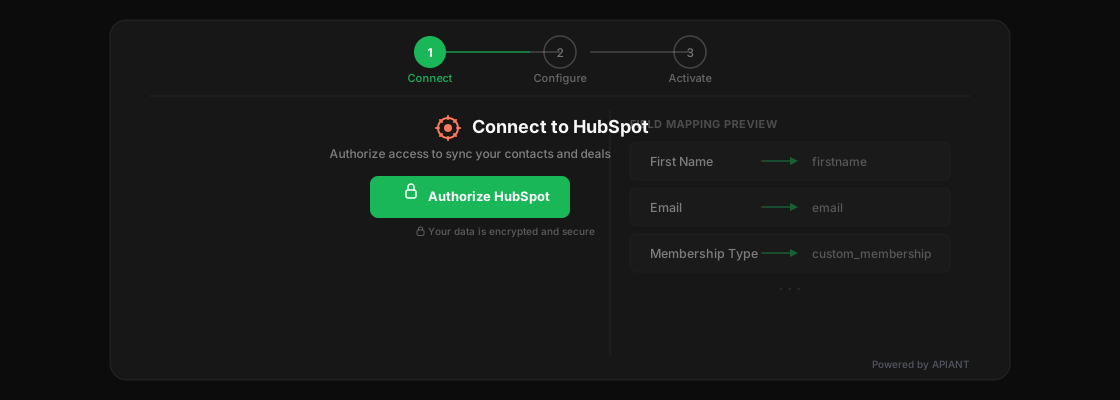
Your customer clicks "Connect to HubSpot" inside your product. A FormApp handles authentication, field mapping, and configuration. APIANT runs the automation behind the scenes. The customer never leaves your product. They never see APIANT. They think it's you.
FormApps embed via iframe or SDK directly inside your SaaS product. No redirects, no external branding.
Your brand, your domain, your look and feel. APIANT stays behind the curtain where it belongs.
Every FormApp is backed by the full APIANT automation engine: connectors, logic, AI, data processing, error handling.
FormApps are the front door to the APIANT platform. Any interface that needs to trigger, configure, or display integration logic can be a FormApp.

Embed configuration panels directly inside your SaaS product. Let customers connect platforms, map fields, and manage sync settings without leaving your interface.

Power the entire in-app integration experience within platforms like ActiveCampaign's App Studio. Surface settings, configuration, and status directly inside the partner's product.

Build intelligent intake forms that use AI to auto-complete fields, validate data, and trigger complex automations the moment a form is submitted. Not a static form. A smart one.

Give end users the power to manage their own integrations. View sync status, adjust settings, re-authorize connections, all through a branded portal you control.

Combine UI, automation, and AI in one surface for internal operations. Build dashboards, admin panels, and workflow tools that connect to any system in your stack.
The automation settings you build in the Automation Editor surface directly into FormApps. No translation layer. No separate UI build. The FormApp IS the settings UI.
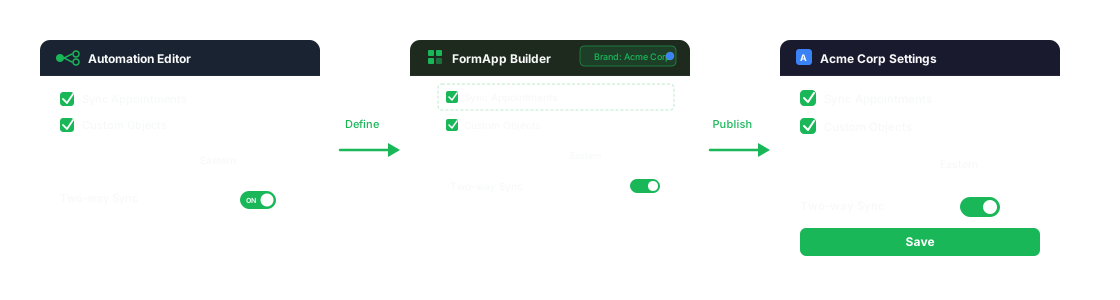
Define settings: checkboxes, dropdowns, multi-selects, the controls that shape how each customer consumes the integration.
Settings surface automatically. Arrange them, brand them, add logic and AI. No re-building the controls from scratch.
End users see a clean configuration panel inside your product. They interact with the same settings that drive the automation logic.
Remember the settings layer in the Automation Editor (the checkboxes, dropdowns, and multi-selects that control how each customer consumes the integration)? Those settings surface directly into FormApps. So when a SaaS company's customer opens an integration configuration panel inside the product, they're seeing and interacting with the same settings that drive the automation logic. No translation layer. No separate UI build. The FormApp IS the settings UI.
FormApps are not just forms. They are programmable UI surfaces backed by the full power of the APIANT platform.
Build interfaces visually. Arrange fields, sections, and components without writing code.
Show and hide fields, sections, or entire steps based on user input and data conditions.
Auto-completion, intelligent defaults, and AI-driven validation powered by the platform's native AI capabilities.
Checkboxes, dropdowns, multi-selects, all driven by the integration logic in the Automation Editor. No re-building.
Drop a FormApp into any web application. iframe for simplicity, SDK for deeper integration and event handling.
Every FormApp has full access to the APIANT automation engine: 500+ connectors, data engine, AI, error handling, and monitoring.
See how a FormApp looks and works in a real embedded scenario.
Build AI-powered UIs that connect directly to the APIANT automation engine. Make integration invisible.
Your request will be posted to our Discord community, where independent builders who run their own APIANT-powered platforms can see it and reach out to you directly to build the integration.
← BackWe'll take a quick look to learn about your business.
Based on what we found, here are integration products that might be a great fit.
Your integration specialist is ready. Alex already knows your platform and what you're looking to build. Choose how you'd like to connect:
Voice call happens right in your browser. WhatsApp options open the app.
Prefer email? We'll follow up at within 2 hours.
Click the button below to start talking. Alex already has your details.
Your browser will ask for microphone access.
← BackExpect to hear from us within one business day.
Something went wrong. Please try again.
