Mindbody and Calendly
✦ New in v4.0 · Live Mindbody availability in Calendly

Mindbody and Calendly, one shared schedule

CalendarConnect v4.0

Put a Calendly booking page on your website that shows Mindbody's real availability the moment a client opens it. They pick a time, and the appointment lands in Mindbody instantly, with the right client, staff member, service, and location.

CalendarConnect Mindbody and Calendly
Trusted by fitness, wellness, and beauty businesses worldwide
Trusted by partners and customers
✦ New in v4.0

How CalendarConnect Works

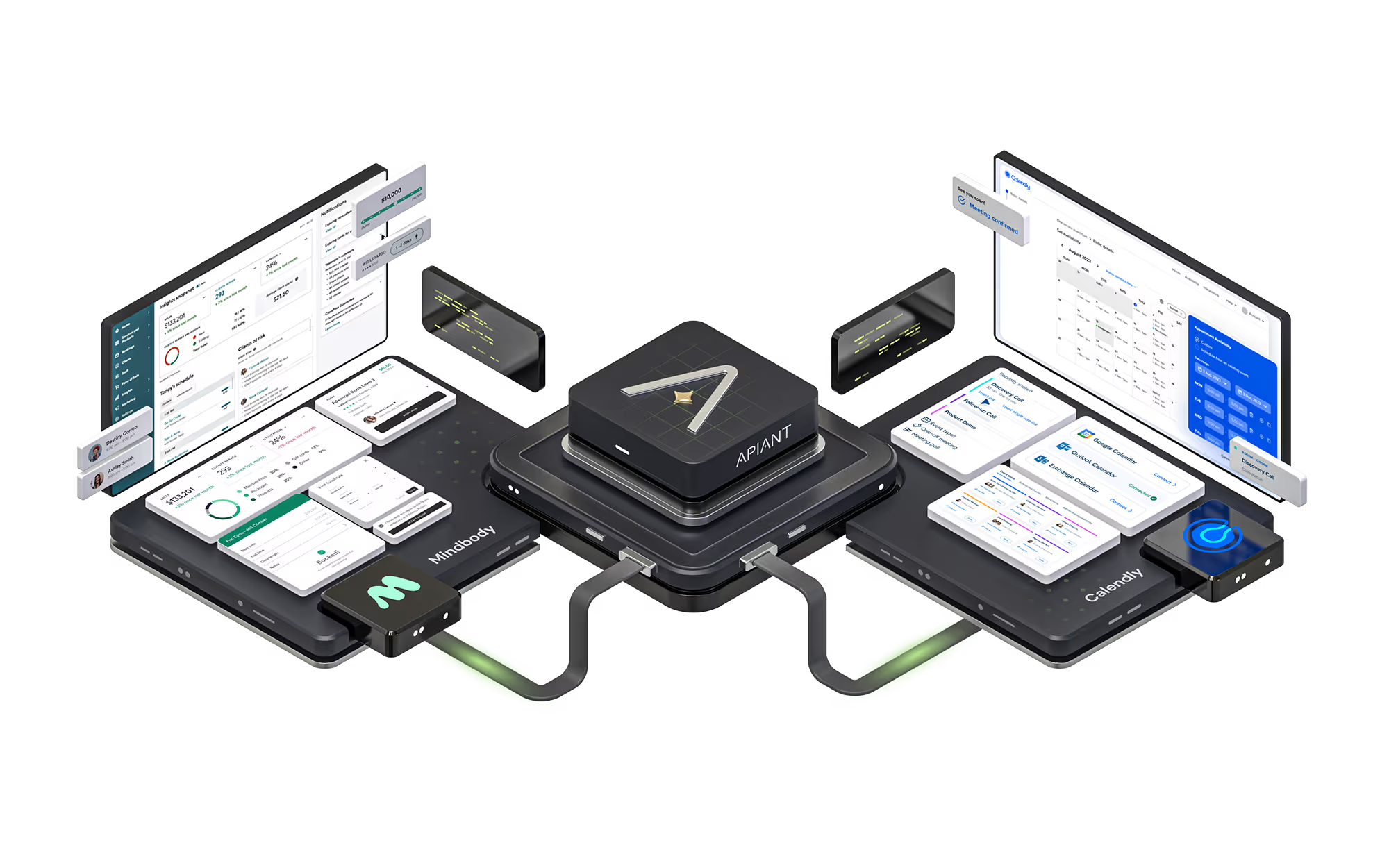
One embed on your website connects Calendly straight to Mindbody. Availability flows out, bookings flow back, and both happen live.

Mindbody your real schedule CalendarConnect by APIANT Calendly on your website 1 · reads live availability 2 · open times, on the fly 3 · client books a time 4 · appointment + client record Availability flows out. Bookings flow back. Both happen live, on every page visit.
1

A client opens your page

CalendarConnect asks Mindbody, right then, for real availability for that service, staff member, and location.

2

Live times appear in Calendly

The times your client sees are the times Mindbody just reported as open, in your location's own timezone.

3

They pick a time and book

The smooth Calendly booking your clients already know, confirmations and text reminders included.

4

It lands in Mindbody instantly

The client is matched by email or created automatically, and the appointment books to the right staff member, service, and location.

Every location, one Calendly account

Works across all your locations and Mindbody site IDs, including cross-regional and data-share setups. Each location's availability comes from its own site in its own timezone, and every booking routes to the right place.

Made for consultations and intro sessions

If you book consults, discovery calls, or intro offers through Calendly, they now run on your live Mindbody schedule and land on your books by themselves. No front-desk copying.

We don't sync your availability. We fetch it, live.

Your Scheduling Is Running on Two Separate Tracks

You have clients booking in Calendly and staff managing schedules in Mindbody. But without the right integration, double-bookings, missed data, and manual workarounds are inevitable.

Double-Booked Appointments

Most integrations refresh your availability on a timer. Anything that changes in Mindbody between refreshes is invisible to Calendly, so the same slot gets sold twice. The gap is the bug.

Manual Schedule Reconciliation

Staff waste hours cross-referencing two calendars, copying bookings by hand, and fixing conflicts instead of serving clients.

Missed Client Data

Without automated sync, new client details from Calendly never reach Mindbody - leaving gaps in your records and missed follow-up opportunities.

Live in 3 Steps. No Coding Required.

1

Connect

Link Mindbody and Calendly. That is the entire list. No Google Calendar, no Google Workspace, no third account to create, and no per-staff authorization: one Calendly organization connection covers your whole team.

2

Configure

CalendarConnect interrogates both systems for you. It pulls your locations, your staff roster, your Calendly event types and hosts, your timezones, and even Mindbody's own required-field rules, then configures itself around what it finds. You answer a handful of questions.

3

Paste and go live

Drop two lines of HTML on your booking page. From then on, every visitor sees live Mindbody availability, and every Calendly booking becomes a Mindbody appointment with the right client, staff, service, and location.

See Pricing →
Flexible pricing based on your needs

Key Features of Mindbody + Calendly Integration

Automatically turn Calendly bookings into Mindbody appointments, providing effortless, accurate scheduling and a superior client experience.

Live Availability, Fetched On Demandv4.0

A client opens your booking page. CalendarConnect reads that practitioner's real bookable availability out of Mindbody right then, filtered to the correct service, staff member, and location, across a rolling 30-day window in your location's own timezone. The times in Calendly are the times Mindbody just reported as open.

Every Location, One Calendly Accountv4.0

Works across all your locations and Mindbody site IDs, including cross-regional and data-share setups. Each location's availability is read from its own Mindbody site in its own timezone, every booking routes to the right location, staff member, and service, and adding a practitioner needs no extra authorization.

A Booking Page That's Ready On Arrivalv4.0

One embed on your website, installed once. Visitors land and the real times are already there, with a one-tap refresh and a visible last-updated stamp. Calendly handles the booking experience your clients already love, confirmations and text reminders included.
Real-Time Appointment Creation

Real-Time Appointment Creation

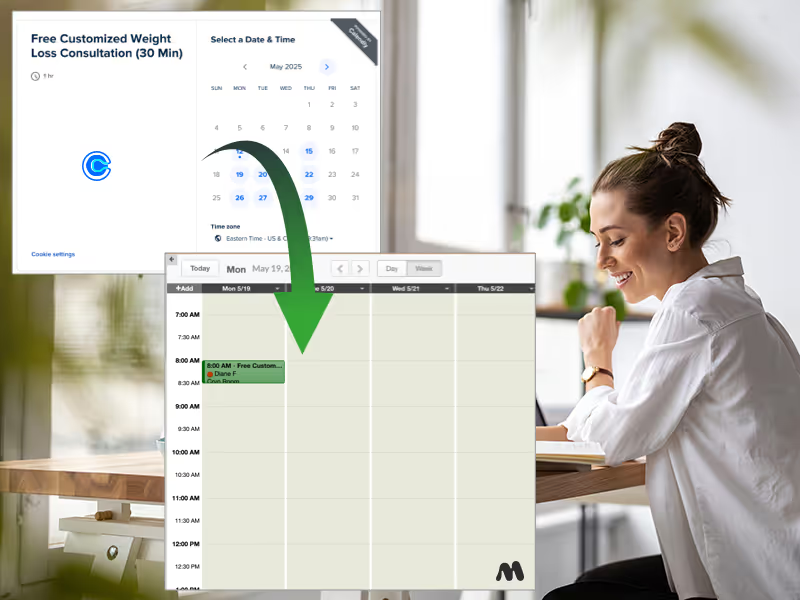
Every Calendly booking becomes a Mindbody appointment the moment it is made, on the correct staff calendar, at the correct location, with the correct service. Duplicate webhook deliveries are filtered, so a booking can never land twice.
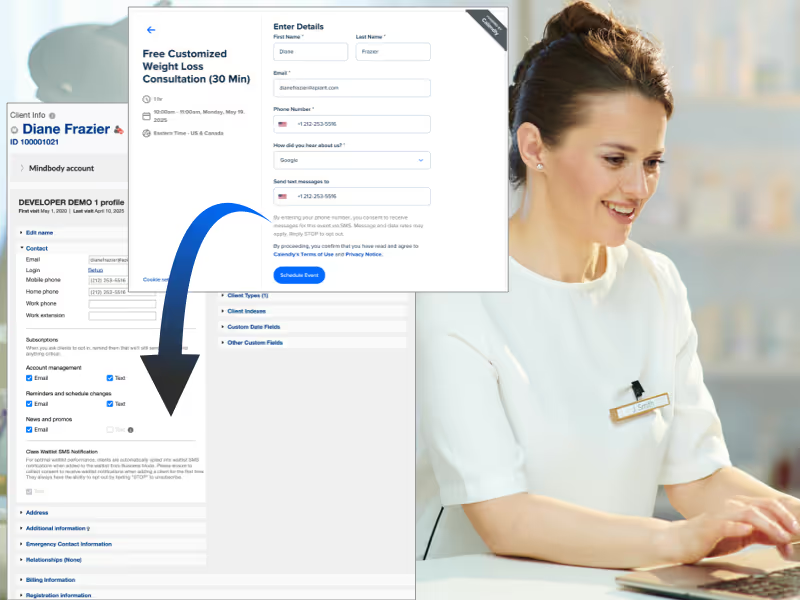
Enhanced Client Data Management

Enhanced Client Data Management

Accurately capture and sync essential client details from Calendly to Mindbody. New clients are automatically created, and existing records stay up-to-date with every booking. New clients are created on the first booking even on Mindbody sites with strict required-field rules, because CalendarConnect reads your site's actual field requirements from Mindbody and satisfies them.
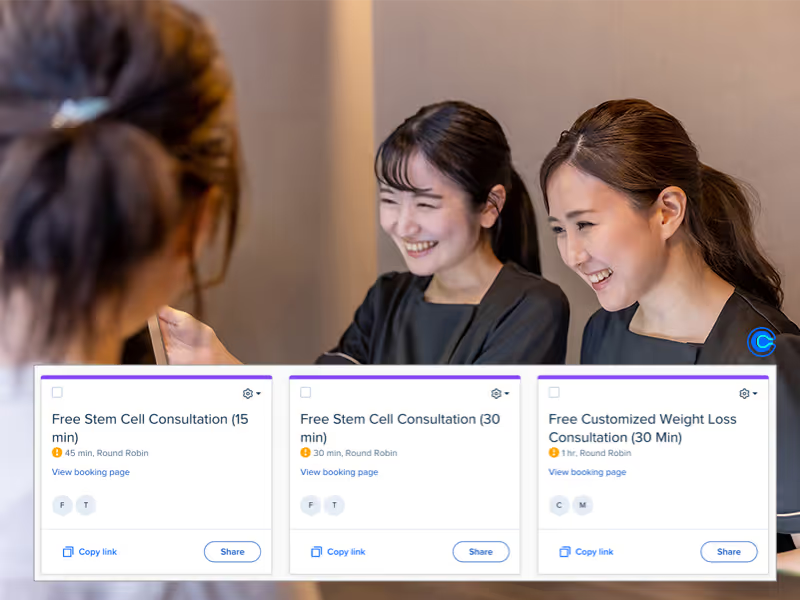
Dynamic Event Handling

Dynamic Event Handling

Effortlessly handle various Calendly event types, mapping each to the correct Mindbody appointment type, staff member, and location automatically. Multi-practitioner and round-robin events are fully supported. Each host contributes their own live Mindbody availability to the shared pool.
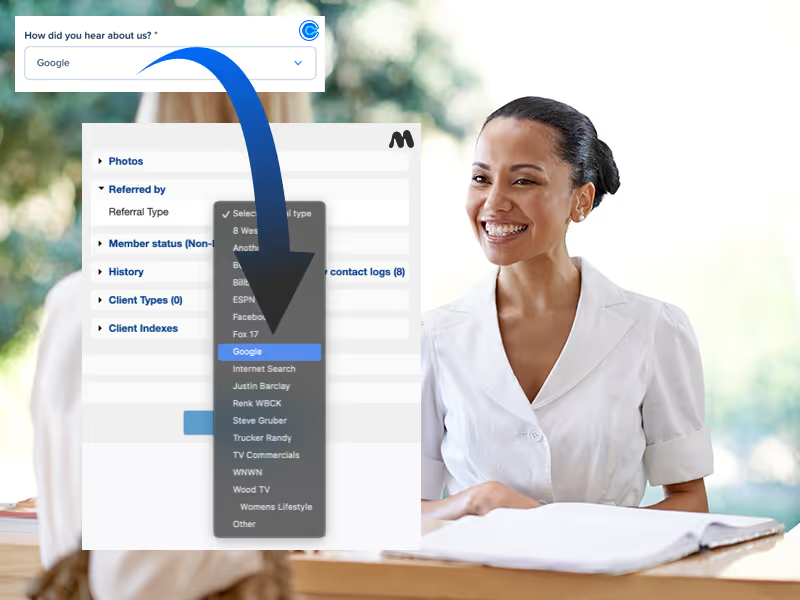
Calendly Question Sync

Calendly Question Sync

Automatically sync answers to custom questions asked in Calendly directly to custom fields or indexes in Mindbody, ensuring personalized and informed client interactions.

See Pricing →
Flexible pricing based on your needs

Every Feature at a Glance

Live Mindbody availability on every page loadv4.0
Direct Mindbody-to-Calendly connectionv4.0
Cross-regional and data-share site supportv4.0
One embed, booking page ready on arrivalv4.0
Times verified against Mindbody before they're shownv4.0
Per-practitioner availability for round-robin events
Rolling 30-day availability window
Service, staff, and location filtered slots
One Calendly connection covers your whole team
Multi-location and multi-site support
One Calendly organization, many Mindbody sites
Real-time appointment creation
Automatic client creation on first booking
Strict required-field handling for Mindbody sites
Calendly custom question sync to Mindbody fields
Dynamic event type to service mapping
Staff assignment mapping
Timezone and daylight-saving accurate
Duplicate booking protection
Mindbody contact log audit trail and failure alerts

What Our Customers Say

Why CalendarConnect vs. DIY Integration Tools?

Integrations aren't side-projects - they're critical infrastructure. CalendarConnect is a turnkey, professionally-engineered solution built by experts with deep domain knowledge in Mindbody and Calendly.

CalendarConnect v4.0
Make / Zapier
Custom Dev
Google Calendar required
No, never
✗ Yes, in practice
Yes, usually
Availability freshness
Fetched on page load
✗ Scheduled sync
Scheduled sync
Times verified against Mindbody before shown
✓ Yes
✗ No
Rarely
Booking page ready on arrival
✓ Yes
✗ No
Custom build
Setup time
< 30 min
Weeks
Months
Real-time booking sync
✓ Instant
✗ Delayed
Custom build
Client auto-creation with strict required fields
✓ Built-in
✗ Manual
Custom build
Multi-site, one Calendly org
✓ Native
✗ Complex
Custom build
Round-robin and multi-host availability
✓ Native
✗ No
Custom build
Duplicate booking protection
✓ Built-in
✗ No
Custom build
Custom question sync
✓ Native
✗ No
Custom build
Maintenance
Zero - we handle it
You fix it
You maintain it
Support
VIP specialist support
Community / generic
Depends on dev
Starting cost
$199/mo
$50 to $200+/mo
$5,000+

Watch how it works in 2 minutes

Watch a client open a booking page, watch live Mindbody availability land in Calendly, and watch the booking hit the Mindbody schedule.

Flexible pricing based on the number of bookings

CalendarConnect bridges Mindbody and Calendly, providing a unified platform to manage your bookings.

Version 4.0 is included at no extra cost for existing customers and requires no Google Calendar connection.

100

Additional Mindbody locations:

$49 / month

Additional Mindbody appointment types:

$19 / month
$199

/month

Includes 100 bookings per month.

Requires a paid Calendly subscription.

Thank you! Your submission has been received!
Oops! Something went wrong while submitting the form.

Mindbody + Calendly on the Blog

Real-world use cases and how-tos for the Mindbody and Calendly integration.

Frequently asked questions

Everything you need to know

Why is this API App better than DIY tools like Make, Appy Pie or Pipedream?
This API App is a turnkey, professionally-engineered integration solution built by experts with deep domain knowledge in both applications.

Unlike DIY tools, which leave you to build, debug, and manage integrations yourself, our integration is pre-built, thoroughly tested, and includes sophisticated logic that ensures data flows accurately, reliably, and on-time.

It’s configurable, so you can tailor how your apps communicate without coding. Plus, you get VIP customer support from specialists who understand your specific business needs. Within minutes, your systems are fully connected - no technical headaches, no trial-and-error.

Integrations aren’t side-projects; they’re critical software infrastructure. Trust them to professionals who've perfected it through years of experience.
How does the pricing compare to DIY integration tools like Make, Appy Pie or Pipedream?
It ultimately depends on how much data you’ll sync between your apps. DIY integration tools typically charge per "task" performed - these costs add up quickly, especially when your integration demands sophisticated logic, data transformations (like dates or currencies), caching, and complex workflows.

Our API Apps, however, are built with advanced features and integrations that simply can't be replicated using these DIY tools.

Price-wise, our solutions offer a clear advantage: at your selected usage level (e.g., number of clients), we often allow you to sync unlimited records, including client data, sales, transactions, and more. This makes our API Apps not only superior in capability but also far more cost-effective as your needs scale.
How does the Calendly and Mindbody sync work?
In two directions. When a client opens your booking page, CalendarConnect reads that practitioner's live bookable availability from Mindbody and writes it straight into Calendly before any times are shown. When the client books, the appointment appears in Mindbody immediately, with the client matched or created, the correct staff member and service assigned, and their intake answers on the record.
Is the sync two-way?
Yes. Availability flows from Mindbody into Calendly, and bookings flow from Calendly into Mindbody. In practice that means an appointment booked directly in Mindbody makes that slot disappear from your Calendly booking page, and a booking made in Calendly appears on your Mindbody schedule.
How often is availability synced?
It is not synced on a schedule at all. It is fetched on demand. Every time a client opens your booking page, CalendarConnect reads Mindbody fresh and updates Calendly before showing any times. There is no interval, so there is no window in which your availability can drift.
How quickly do bookings reach Mindbody?
Instantly. Calendly notifies CalendarConnect the moment a booking is made and the Mindbody appointment is created straight away.
Do I need Google Calendar?
No. Connecting Mindbody to Calendly used to require routing your availability through Google Calendar, because that was the only way Calendly could see an outside schedule. Version 4.0 writes availability directly into Calendly instead. You do not need Google Calendar, you do not need Google Workspace, and nothing is written to your staff's personal calendars.
I already use Google Calendar. Do I have to disconnect it?
No, and CalendarConnect does not touch it. It simply is not part of the integration anymore. Your staff can keep using Google Calendar for whatever they use it for.
Does my visitor have to click anything to see available times?
No. The page loads live availability automatically. They see a brief spinner, then real Mindbody-bookable times. If they leave the page open they can refresh the times with one tap and see when the list was last updated.
Which Calendly plan is required?
CalendarConnect requires a paid Calendly plan, because writing availability into Calendly uses capabilities that are not on Calendly's free tier.
Do I need to authorize every staff member's Calendly?
No. One Calendly organization connection covers your whole team, including hosts you add later.
What if the Calendly client isn't in Mindbody?
A new Mindbody client profile is created automatically on the first booking. CalendarConnect reads your site's own required-field rules first, so profiles are created successfully even on Mindbody sites with strict validation.
Can I run multiple locations?
Yes. One Calendly organization can serve all of your Mindbody locations, even locations running as separate Mindbody sites, including cross-regional and data-share setups. Bookings route to the correct location, staff member, and service automatically, and each location's availability is read from its own Mindbody site in its own timezone.
Can I sync multiple Calendly event types?
Yes. Configure as many event types as you need, each mapped to its own Mindbody service, staff, and location.
What happens if a booking fails?
You hear about it immediately. CalendarConnect can flag the failure on the client's Mindbody record, email your admin contact, and email the Calendly host, each switchable independently. Every failed booking is also logged in full so support can replay it without asking you to re-enter anything.
Is additional manual entry needed?
No, the integration completely automates the entry of bookings from Calendly to Mindbody.
Still have questions?

Can’t find the answer you’re looking for? Please chat to our friendly team.

Ready to Connect Mindbody and Calendly?

Version 4.0 is live. Your real Mindbody availability in Calendly the moment a client looks, and every booking on your Mindbody schedule instantly.

Explore More Mindbody API Apps

Discover our other ready-to-use integrations designed to streamline your Mindbody workflows and drive business growth effortlessly.

CRMConnect
Mindbody and HighLevel

Marketing automation solution that transforms Mindbody data into sophisticated engagement campaigns. Real-time synchronization of client activities, purchases, and memberships enables intelligent, targeted communications.
CRMConnect
Mindbody and HubSpot

Marketing automation solution that transforms Mindbody data into sophisticated engagement campaigns. Real-time synchronization of client activities, purchases, and memberships enables intelligent, targeted communications.
ShopConnect
Mindbody and Shopify

Robust integration that brings your Mindbody data into Keap. Automated synchronization of clients, sales, services, and memberships enables sophisticated marketing automation and client engagement.
ZoomConnect
Mindbody and Zoom

Robust integration that brings your Mindbody data into Keap. Automated synchronization of clients, sales, services, and memberships enables sophisticated marketing automation and client engagement.
CRMConnect
Mindbody and ActiveCampaign

Business integration that mirrors your entire Mindbody operation in ZohoCRM. All business objects - clients, sales, payments, services, memberships, and contracts - are automatically synchronized in real-time, enabling unified management across multiple locations.
CRMConnect
Mindbody and Keap

Business integration that mirrors your entire Mindbody operation in ZohoCRM. All business objects - clients, sales, payments, services, memberships, and contracts - are automatically synchronized in real-time, enabling unified management across multiple locations.
CRMConnect
Mindbody and Klaviyo

Business integration that mirrors your entire Mindbody operation in ZohoCRM. All business objects - clients, sales, payments, services, memberships, and contracts - are automatically synchronized in real-time, enabling unified management across multiple locations.
CRMConnect
Mindbody and ZohoCRM

Business integration that mirrors your entire Mindbody operation in ZohoCRM. All business objects - clients, sales, payments, services, memberships, and contracts - are automatically synchronized in real-time, enabling unified management across multiple locations.
AppConnect
Mindbody and Zapier

Business integration that mirrors your entire Mindbody operation in ZohoCRM. All business objects - clients, sales, payments, services, memberships, and contracts - are automatically synchronized in real-time, enabling unified management across multiple locations.
Blog Posts

CRMConnect bridges Cliniko and HubSpot, providing a unified platform to manage patient information and client relationships efficiently.

Blog Posts
Mindbody and Klaviyo
Automatically synchronize patient and contact data, including demographics, preferences, and appointment history.
Alec Whitten • 17 Jan 2022
Podcasts
Mindbody and Klaviyo
Automatically synchronize patient and contact data, including demographics, preferences, and appointment history.
Alec Whitten • 17 Jan 2022
Webinars
Mindbody and Klaviyo
Automatically synchronize patient and contact data, including demographics, preferences, and appointment history.
Alec Whitten • 17 Jan 2022
Case Studies
Mindbody and Klaviyo
Automatically synchronize patient and contact data, including demographics, preferences, and appointment history.
Alec Whitten • 17 Jan 2022
Schedule a Demo

Contact Us

Have a question about ? Send us a message.